
This is step 2 in a 24 step video series that shows you how to install the corner or eave brackets in a Sierra model Absolute Steel building.
This particular building is a Sierra model and uses a corner eave bracket. These come to you unfolded for packing purposes and you need to fold them to fit the corners of your eave. Place the eave brackets on the bent corners of the side bend. Align the bracket with the roof slope and side wall portions of the side bend using a straight edge and attach them with 4 screws on each side.
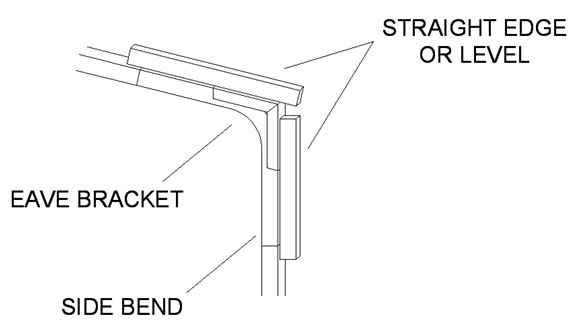
Take measurements from the first assembly and transfer that measurement to the remaining side bends to help keep all of the corner brackets in the same position on the side bends. This will ensure your building is straight and correct.

Video Index:
1. The foundation
2. Eave or corner brackets
3. Roof & wall assembly
4. Truss assembly
5. Hat channel spacing
6. Base rail assembly
7. Anchoring base rails
8. Wall & roof to base
10. Install back enclosure
11. Install front enclosure
12. Door & window frame
13. Girts & hat channel
14. Radiant barrier insulation
15. Side exterior panels
16. Gable end panels
18. Corner trim
19. Roof panels
20. Doors & windows
21. Eave trim
22. Gable trim
23. Ridge cap
24. Finishing touches